Higgsfield가 공개한 실전 워크플로 전문 해부 — 캐릭터 시트부터 15초 4K 시네마틱 컷까지, 실제로 쓴 프롬프트가 전부 공개됐다
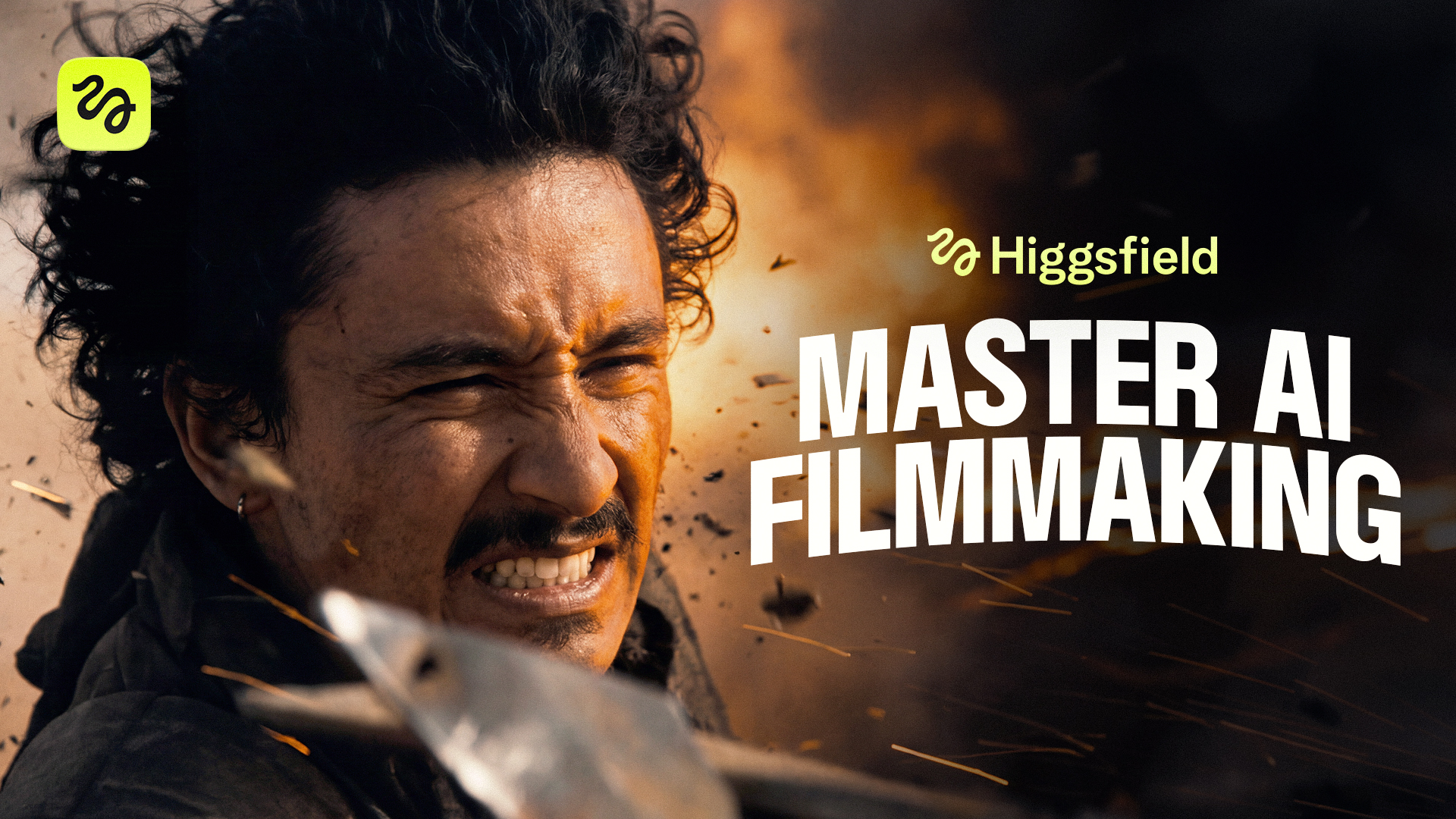
‘Blockbuster’ — Higgsfield 안에서 Seedance 2.0으로 4개 배경을 넘나들며 완성한 시네마틱 AI 어드벤처 단편
AI 영상 플랫폼 Higgsfield가 자사 블로그에 완전한 AI 단편영화 제작 워크플로를 통째로 공개했다. ‘Blockbuster’라는 제목의 이 단편은 해적선·사막·정글·아파트 네 개의 배경을 넘나드는 시네마틱 어드벤처로, 전편이 Higgsfield 안에서 Seedance 2.0을 통해 4K로 생성됐다. 캐릭터 시트 제작부터 최종 렌더링까지 각 단계마다 ‘실제로 사용한 프롬프트’를 그대로 공개한 것이 핵심으로, 크리에이터가 프롬프트를 복사해 자신의 이야기에 바꿔 넣을 수 있도록 만들어졌다.
전체 워크플로 한눈에 보기
제작 루틴은 일관된 파이프라인을 따른다. 먼저 Soul Cinema로 원본 이미지를 생성하고(간단한 프롬프트로 다양한 변형을 뽑는다), GPT Image 2로 세부를 편집해 최종 클린 시트를 완성한다. 그다음 모든 장면의 프롬프트는 Claude Skill이 작성하고, 최종 영상은 Seedance 2.0에서 렌더링된다. Higgsfield가 함께 공개한 유튜브 풀 튜토리얼 제목이 ‘Seedance 4K + Claude Fable 5’인 데서 알 수 있듯, 프롬프트 자동 생성에는 Claude(Fable 5) 기반 스킬이 쓰였다.
Higgsfield 공식 풀 튜토리얼 — 처음부터 끝까지 만드는 바이럴 AI 단편영화 (Seedance 4K + Claude)
1단계 — 에셋 먼저, 영상은 나중에
이 워크플로의 첫 번째 원칙은 “영상을 한 컷도 생성하기 전에 에셋부터 완성하라”는 것이다. 여기서 에셋이란 캐릭터 시트, 로케이션, 소품을 말한다. 이들 각각은 여러 장면에 반복 등장하기 때문에, 고정된 레퍼런스를 미리 만들어두는 것이 주인공의 얼굴, 소품, 배경을 컷마다 동일하게 유지하는 유일한 방법이다. AI 영상에서 가장 어려운 ‘일관성’ 문제를 사전 제작으로 해결하는 접근이다.
가이드는 주인공(해적 ‘에두아르도’), 로케이션(선장실), 소품(배 두 척) 등 핵심 에셋 제작 과정을 단계별로 보여준다.
주인공 — 해적 캐릭터 시트
참조 사진을 바탕으로 정면 전신, 후면 전신, 정면 클로즈업 세 가지 뷰의 캐릭터 시트를 생성한다. 클로즈업은 모델이 정확히 ‘고정’할 얼굴을 제공하며, 회색 배경은 생성물을 깔끔하게 유지한다. 프롬프트는 촬영·조명·인물 특징을 흉터 하나까지 집요하게 지정하는데, 이 디테일들이 모든 뷰·모든 장면에서 동일하게 유지되어야 캐릭터가 ‘같은 사람’으로 보이기 때문이다.
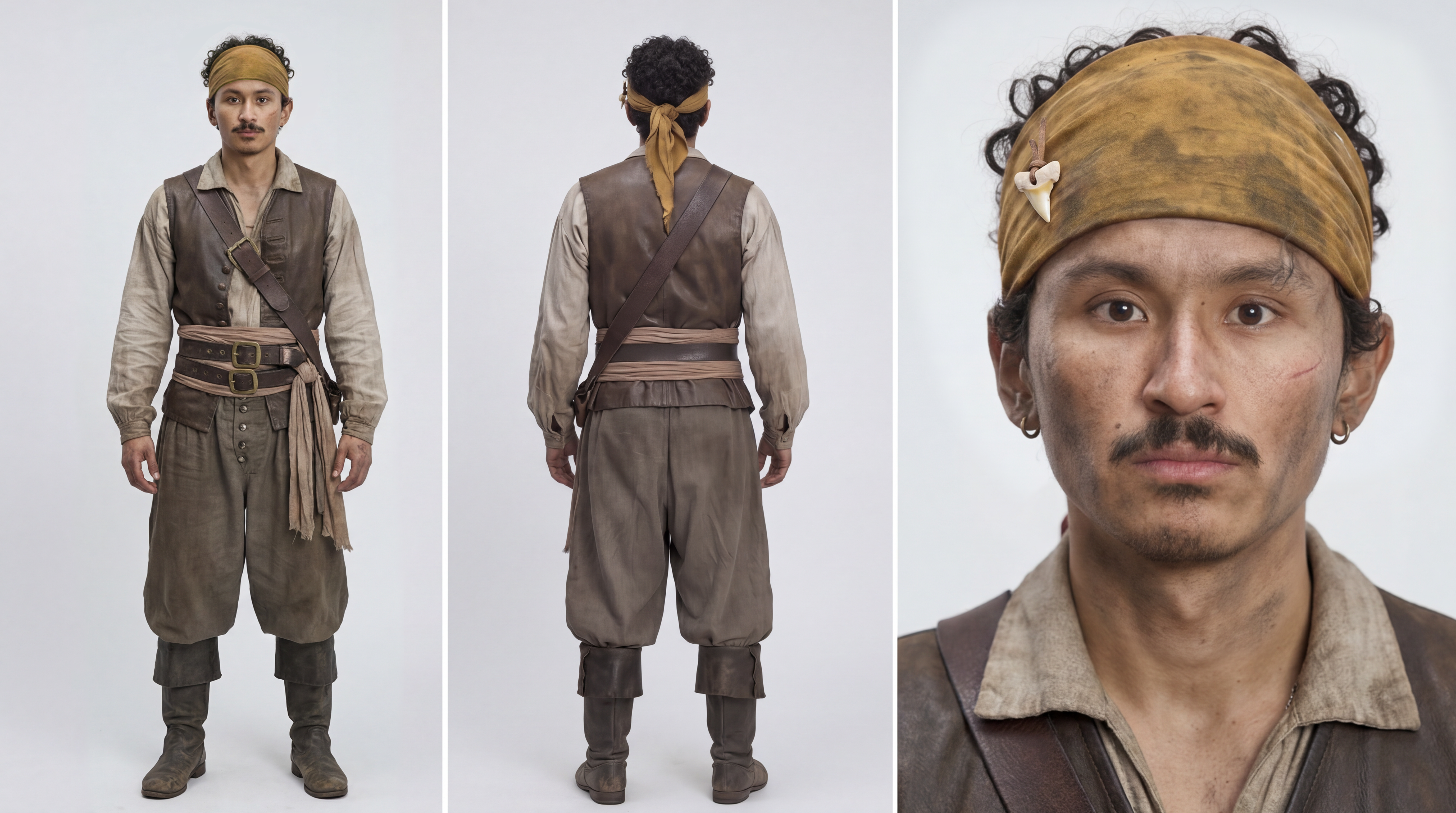
주인공 캐릭터 시트 — 정면·후면·클로즈업 3뷰 (Soul Cinema 생성)
▶ 사용된 프롬프트 (영문 원문)
3-view character reference sheet for a film character. Gritty cinematic 35mm film photograph, naturalistic editorial reference, fine film grain. Lit with very soft, low, diffused natural light — a large heavily-diffused source dimmed well down, the quality of soft shade or thin overcast through a scrim, wrapping gently around the face with extremely smooth gradual falloff. Low-key restrained exposure, slightly underexposed and moody; absolutely no harsh shadows, no hotspots, no blown highlights, no hard edges of light; kept consistent across all three panels. Neutral medium-grey seamless backdrop — a clear mid-grey, never white. Age-of-sail pirate costume, weathered and slightly dirty look. The same man in all three views: youthful attractive man in his early 30s, warm olive-brown skin, dark thick curly hair (medium length, natural curl), thin mustache with a small soul-patch under the lip, faint stubble along the jaw, two small silver hoop earrings on the left ear, thin silver chain necklace, subtly asymmetrical face. A small, thin, subtle healed scar near the RIGHT eye — a short faint pale line on the cheekbone just below the outer corner of the eye. Keep the exact same facial identity, bone structure, features and this small subtle right-side scar across all three views. Both arms whole and both hands normal. Early-18th-century pirate attire: a YELLOW pirate durag/head wrap tied over the curly hair. A small white shark tooth pendant threaded on a thin leather cord attached to the durag above the left temple. An open loose off-white linen shirt, a worn dark leather vest, a wide sash at the waist, baggy dark breeches tucked into scuffed leather boots. Layout: three panels side by side on a neutral medium-grey seamless. LEFT panel “FRONT, full body”; CENTER panel “BACK, full body”; RIGHT panel “FRONTAL CLOSE-UP”. Cinematic film-photo finish, never plastic CGI skin. 16:9 horizontal sheet.
완성 후 중요한 편집이 하나 따른다 — 시트에 얼굴이 여러 개 있으면 Seedance가 어떤 얼굴을 기준으로 삼을지 혼란스러워해 장면이 진행될수록 주인공 얼굴이 조금씩 변형된다. 그래서 클로즈업 얼굴만 남기고 전신 샷의 얼굴은 지운다.
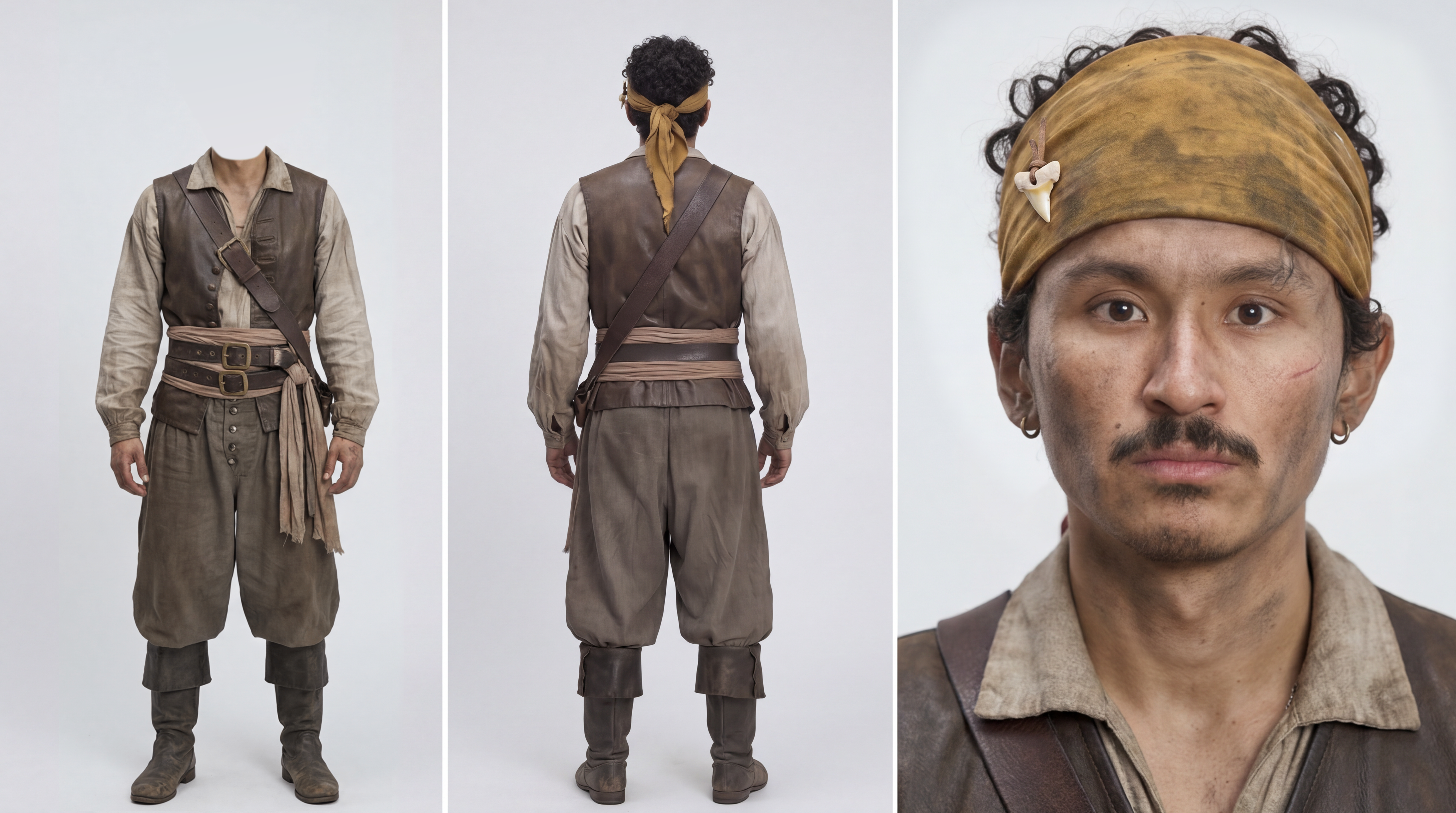
편집본 — 첫 번째 패널(전신)의 얼굴을 지워 기준 얼굴을 하나로 만든다 (GPT Image 2 편집)
▶ 사용된 프롬프트 (영문 원문)
Erase the face from the full-body shot on the first panel.
로케이션 — 선장실
테이블, 매달린 랜턴, 벽의 지도, 널빤지 틈으로 새어 드는 가느다란 햇빛까지 담아 갑판 아래 선장실을 생성한다. 정면이 아닌 3/4 앵글을 요청하는 것이 포인트로, 이렇게 하면 깊이감이 생겨 카메라가 움직일 때 붙잡을 공간이 훨씬 많아진다.
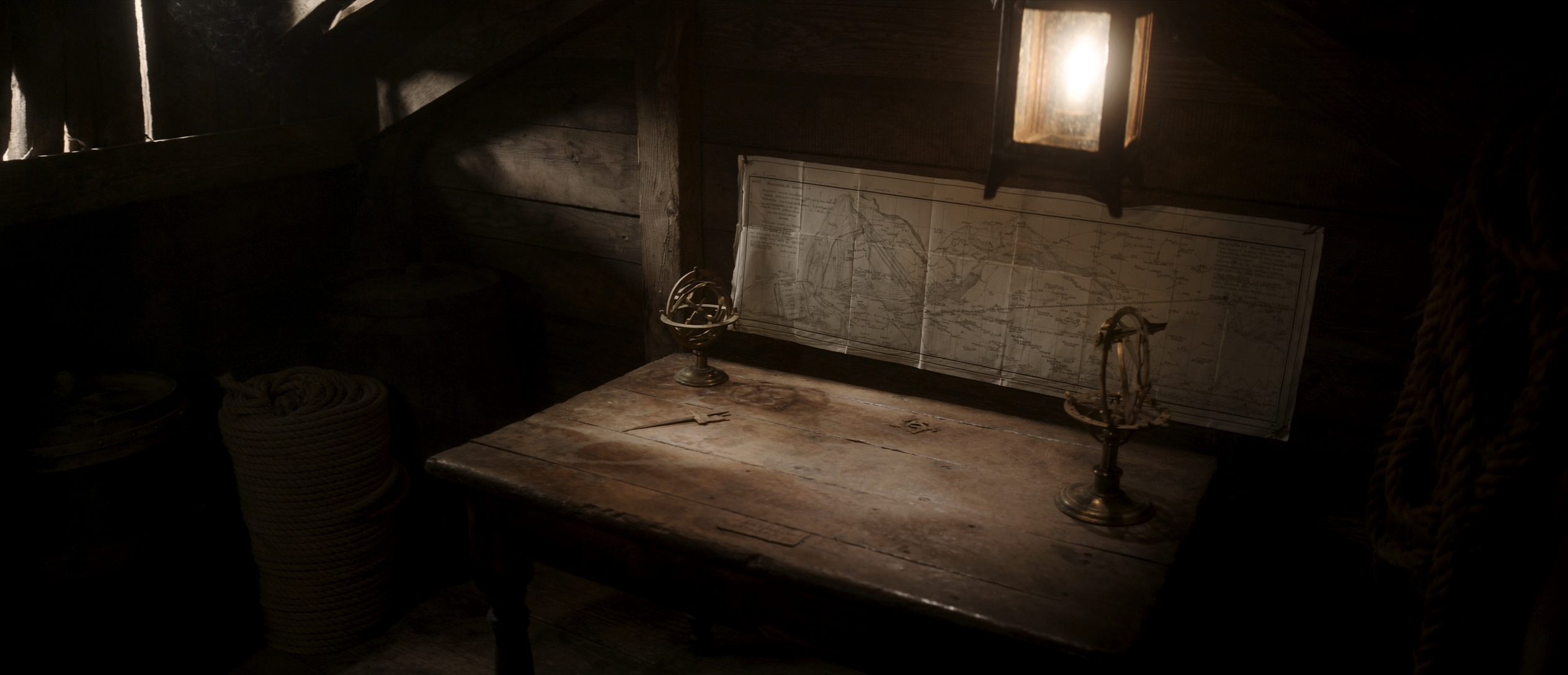
로케이션 ‘선장실’ — 3/4 앵글로 요청해 깊이감을 확보 (Soul Cinema 생성)
▶ 사용된 프롬프트 (영문 원문)
Photorealistic cinematic movie still, grounded period maritime realism, early 18th-century Golden Age of Piracy, Caribbean privateer vessel. A cramped below-deck captain’s cabin on an old wooden sailing ship. A large weathered sea-chart is pinned to the rough plank back wall above a heavy waxed-oak table strewn with brass navigation instruments — dividers and a sextant. A gimbaled brass lantern hangs low in the upper frame, throwing a warm pooled glow into deep corner shadow. Tarred coiled rope and a barrel fill the foreground edges. Low heavy-beamed ceiling, rough plank walls and floor. Mid-morning, calm weather. Wide three-quarter interior establishing shot, eye-level, slow push-in. Painterly low-key cinematography: warm tungsten lantern as the single key practical from frame-left, soft Rembrandt pooling, deep shadow falloff, thin hard daylight slivers leaking through plank gaps. Colour palette of aged oak brown, tarred black, oxidized brass amber, sun-bleached parchment cream — warm-leaning but desaturated, muted period grade. Shot on a modern digital cinema camera with vintage spherical prime lenses, 24mm, 2.39:1 Cinemascope. Fine low-intensity 35mm grain. Drifting dust motes in the lantern beam, faint smoke haze.
소품 — 배 두 척
배는 한 장의 스플릿 스크린 시트에 같은 배의 전방 3/4와 후방 3/4를 함께 생성한다. 모델이 배를 어느 방향에서든 동일하게 인식하도록 하기 위해서다.
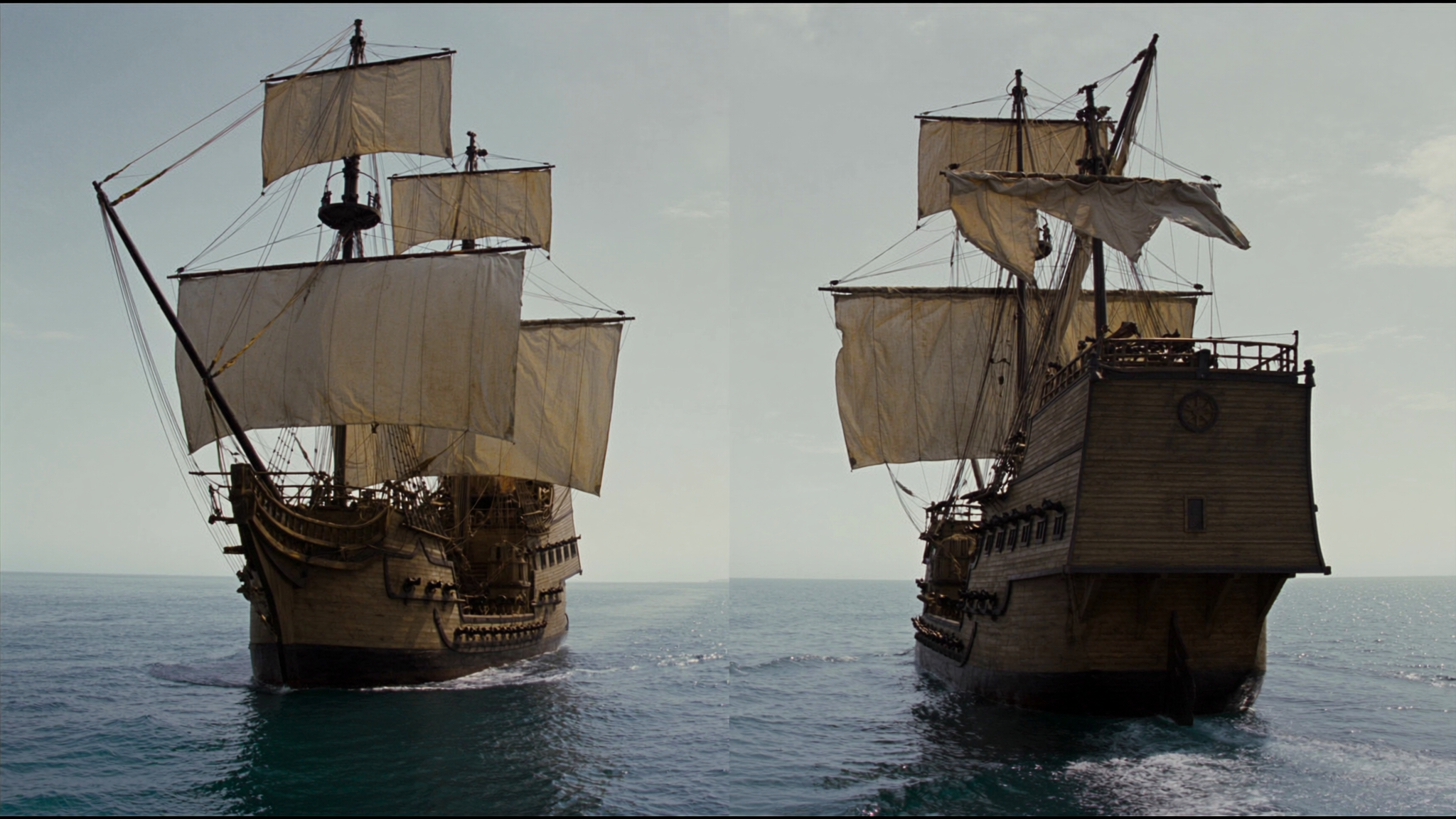
주인공의 배 — 같은 배의 전방 3/4와 후방 3/4를 한 시트에 담아 어느 각도에서도 일관되게 유지 (Soul Cinema 생성)
▶ 사용된 프롬프트 (영문 원문)
Split-screen sheet, same two-masted pirate ship twice: LEFT front 3/4 (bow, bowsprit, foaming wave); RIGHT rear 3/4 (transom stern, wheel, wake). Aged wood hull, furled grey sails, cannons, calm grey ocean, overcast. Photoreal.
더 크게 나온 배가 적선이 되는데, 위협적으로 보이게 만들어야 했다. 그래서 이 배 이미지를 다시 GPT Image 2에 입력으로 넣고, 돛을 펼쳐 검게 만들고 해골 문양을 추가하는 편집을 얹었다.
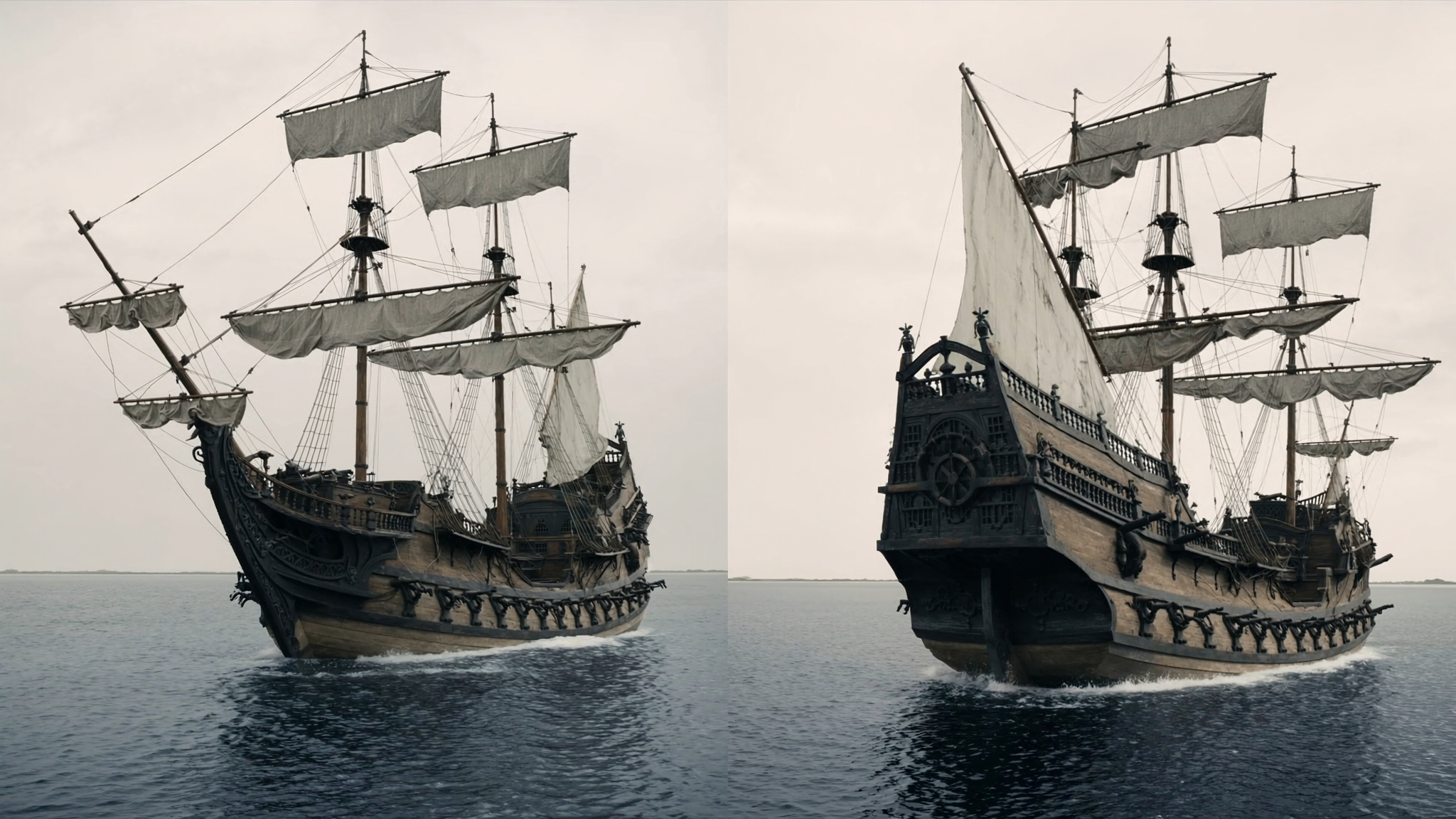
편집 전 원본 배 이미지 — 이 배를 GPT Image 2에 다시 넣어 적선으로 변형한다
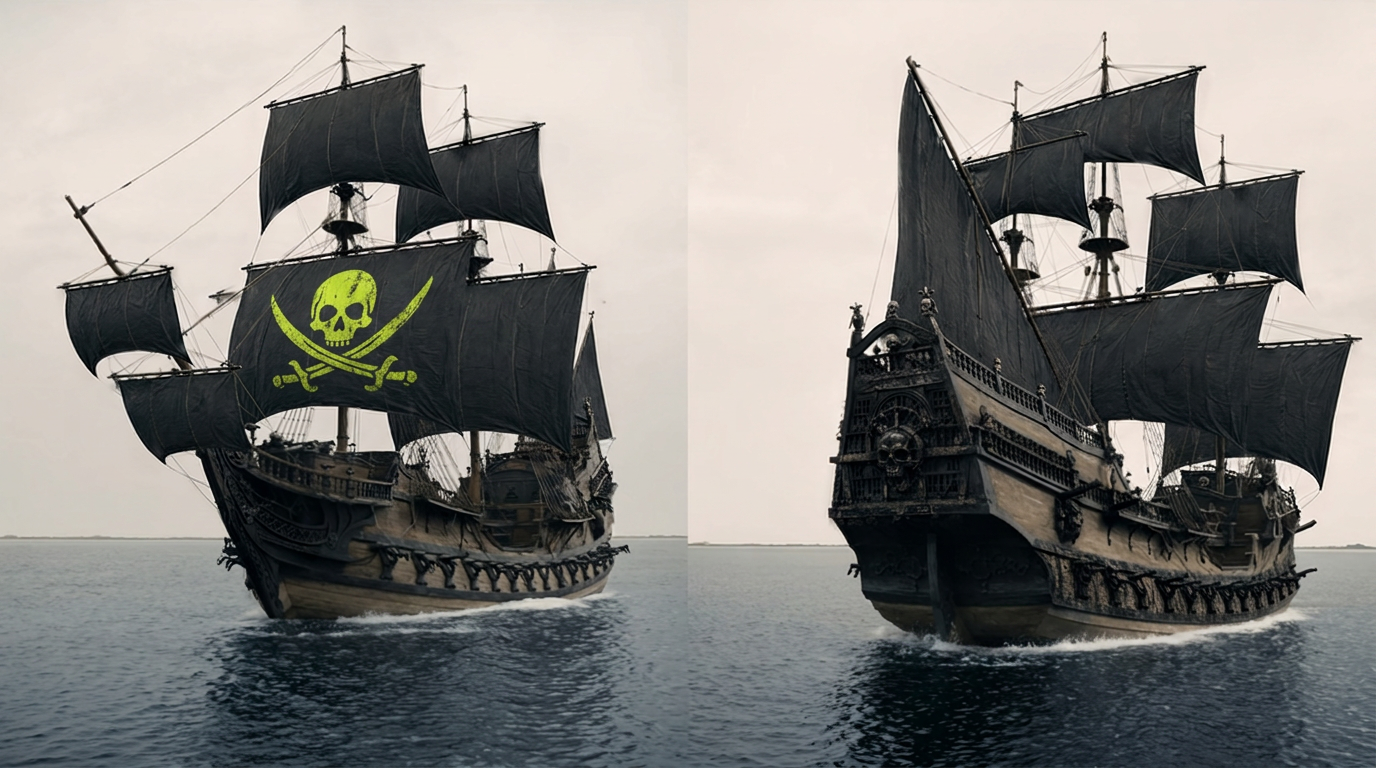
GPT Image 2 편집 결과 — 돛을 펼쳐 검게 만들고 해골 문양(#D1FE17)을 얹어 적선으로 변신 (배경은 그대로 유지)
▶ 사용된 프롬프트 (영문 원문)
Edit the provided reference image — a two-panel side-by-side diptych of the same wooden galleon on calm water under a pale overcast sky. Fully unfurl and deploy all the ship’s sails on every yard and mast so they are completely open and billowing in the wind — no furled, rolled-up, or partially stowed sails anywhere. Change all the sails to deep matte black. In the LEFT panel only, add a large menacing pirate skull-and-crossbones emblem printed on the largest black mainsail — emblem colour exactly hex #D1FE17, bright chartreuse yellow-green, looking weathered and hand-painted onto the sail fabric, following the sail’s curvature, billow, and folds, with slightly cracked and faded paint. The RIGHT ship keeps plain black sails with no emblem. Add light pirate styling to the ship. Do not change the background at all — keep the exact same calm sea, the exact same pale overcast sky, the exact same dual side-by-side two-panel composition, the wooden hull geometry, masts, rigging layout, and each ship’s pose and angle exactly as in the original. Photorealistic, cinematic, matching the original’s muted desaturated colour grade. No text, no watermark.
2단계 — Claude Skill이 프롬프트를 대신 쓴다
이 워크플로의 가장 독특한 부분이다. Seedance 프롬프트를 손으로 쓰지 않고, Claude에 설치한 스킬(.skill 파일)이 대신 작성한다. 설정 방법은 이렇다 — Claude의 ‘Customize → Skills’에서 Higgsfield가 제공하는 스킬 파일을 업로드하고, 새 대화창에 각본과 모든 에셋 시트를 첨부한 뒤 요소 목록을 준다. 그러면 사용자가 장면을 평범한 말로 설명하기만 하면, 스킬이 이를 여러 컷으로 나누고 감독 노하우까지 포함한 완전한 프롬프트를 작성해준다.
핵심은 이름표(태그) 시스템이다. 각 에셋에 ‘@eduardo(주인공)’, ‘@loc_cabin(선장실)’, ‘@main_ship_sheet(주인공의 배)’, ‘@villain_ship_sheet(적선)’ 같은 태그를 붙이고, Higgsfield의 ‘Elements’에도 똑같은 이름으로 등록한다. 그러면 장면 생성 시 프롬프트가 이 태그로 입력 에셋을 자동 매칭해, 캐릭터나 소품이 섞이지 않는다. 장면당 작업 흐름은 “무슨 일이 일어나는지 말로 설명 → 필요한 에셋 첨부 → 프롬프트 받기 → Seedance 2.0에서 실행 → 결과를 보고 다시 Claude에 정확한 수정 요청”으로 반복된다.
3단계 — 실제 렌더링 사양과 프롬프트 구조
공개된 각 장면 프롬프트는 하나의 고정된 템플릿을 따른다 — 장면 맥락(Scene Context) → 참조 에셋(Active References) → 위치 배치(Location Map) → 컷별 액션(Cut 1, 2, 3…) → 광학·카메라·조명·오디오 → 고정값(Positive Locks) 순이다. 오디오는 항상 현실음(대사·효과음·환경음)만 생성하고, 음악은 나중에 편집 단계에서 입힌다. 흥미롭게도 한 번의 생성으로 여러 컷의 전환, 대사, 사운드가 한꺼번에 나온다.
실제 실행 사양은 Seedance 2.0 모델, 21:9 화면비, 4K 해상도, 15초 길이, 오디오 on이다. 프롬프트에는 “MS 47°”, “MCU 29°” 같은 촬영 용어, 3200K/5600K 색온도 조명 지시, “핸드헬드 1~2cm 브레스” 같은 카메라 움직임까지 실제 촬영 현장의 언어가 그대로 담긴다. 캐릭터 일관성을 위해 프롬프트 끝의 ‘고정값(Positive Locks)’ 섹션에서 “지도의 그림은 모든 프레임에서 동일하게 유지”, “등장인물은 에두아르도와 선원 단 둘뿐” 같은 규칙을 못박는 것이 특징이다.
전체 장면 프롬프트는 블로그에서 확인
이 기사에서는 워크플로의 핵심 원리와 사전 제작(에셋) 단계를 중심으로, 각 에셋에 실제 사용된 프롬프트까지 정리했다. Higgsfield 블로그 원문에는 이 글에 다 담지 못한 장면별(Scene 1의 Part 1~5) 실제 Seedance 프롬프트 전문이 그대로 공개돼 있다 — 선장실에서 지도를 발견하는 장면, 망원경으로 적선을 발견하는 장면, 적 선장이 대포를 쏘는 롱테이크, 슬로모션 피격 장면 등 각 컷의 완성된 프롬프트를 ‘Copy’ 버튼으로 바로 복사하거나 ‘Recreate’ 버튼으로 Higgsfield에서 즉시 재현해볼 수 있다. 스킬 파일(higgsfield-seedance-prompt.skill)과 장면별 에셋 묶음(zip)도 함께 내려받을 수 있으니, 실제로 따라 만들어보려는 크리에이터는 원문 튜토리얼을 참고하기를 권한다.
의의 및 전망
이 워크플로 공개가 보여주는 것은, AI 영상 제작이 “프롬프트 하나 넣고 운에 맡기는(prompt-and-pray)” 단계를 지나 체계적인 파이프라인으로 진화했다는 점이다. 사전 에셋 구축으로 일관성을 확보하고, AI(Claude Skill)에게 프롬프트 작성을 위임하며, 촬영 용어 수준의 정밀한 지시로 컷을 통제하는 방식은, 개별 크리에이터도 다장면 시네마틱 단편을 만들 수 있는 실질적인 방법론을 제시한다. 특히 Higgsfield가 실제 프롬프트 전문과 스킬 파일까지 공개한 만큼, 이를 자신의 스토리에 맞게 변형해 곧바로 실험해볼 수 있다는 점이 크리에이터에게 큰 가치다. 다만 이 완성도는 수십 개의 에셋을 미리 만들고 태그로 관리하는 상당한 사전 작업을 전제로 한다는 점도 함께 기억할 필요가 있다.
📅 원문 날짜: 2026년 8월 2일 | 출처: Higgsfield Blog